Built for the data your team can't lose.

Per-agent OAuth scoping that enforces least privilege at the OAuth grant. Confidential-compute infrastructure available for sensitive workloads. Audit-logged by construction.

Five trust layers.

Every concern your security review will have, organised by the layer it lives in.

Confidential compute available.
Hardware-isolated TEE with cryptographic remote attestation. CPU-level memory encryption keeps plaintext sealed in the enclave — not even we can see what your agent processes. Toggle per agent for sensitive workloads. See how it works →

1. Identity & access

  • OAuth scope-exact matching — connectors only get the scopes you explicitly grant
  • Per-agent OAuth scoping — Agent A reads, Agent B writes; the flow requests the minimum each one needs
  • Role-based access control across teams
  • Refresh-token rotation with revocation enforced server-side

2. Data in motion

  • TLS 1.3 on every external connection
  • Prompt-injection scanner: critical and high risk levels block on every tool call
  • Guardrails enforced at the platform layer — not by trusting the LLM to police itself

3. Data at rest

  • At-rest encryption for every customer data path
  • Data residency options coming soon
  • Original uploaded files preserved alongside their compiled wiki form

4. Data in use — confidential compute

  • Trusted Execution Environment — hardware-isolated CPU enclave with cryptographic remote attestation
  • CPU-level memory encryption — LLM input and output stay inside the enclave
  • Remote attestation — the enclave proves its identity before any sensitive data is sent
  • Per-account execution sandbox — connector code runs inside an isolated E2B sandbox bound to the user's account, not inside our application process
  • Architecture is partner-agnostic; we can change providers without changing the security model

5. Operational status

  • SOC 2 audit in progress — current status and security overview available on request
  • Full audit log per agent, per user, per tool call — exportable for review
  • Privacy-by-design: data minimisation, scoped retention, right to deletion on request
  • Security questionnaire + control mapping available — talk to us

Talk to our security team →

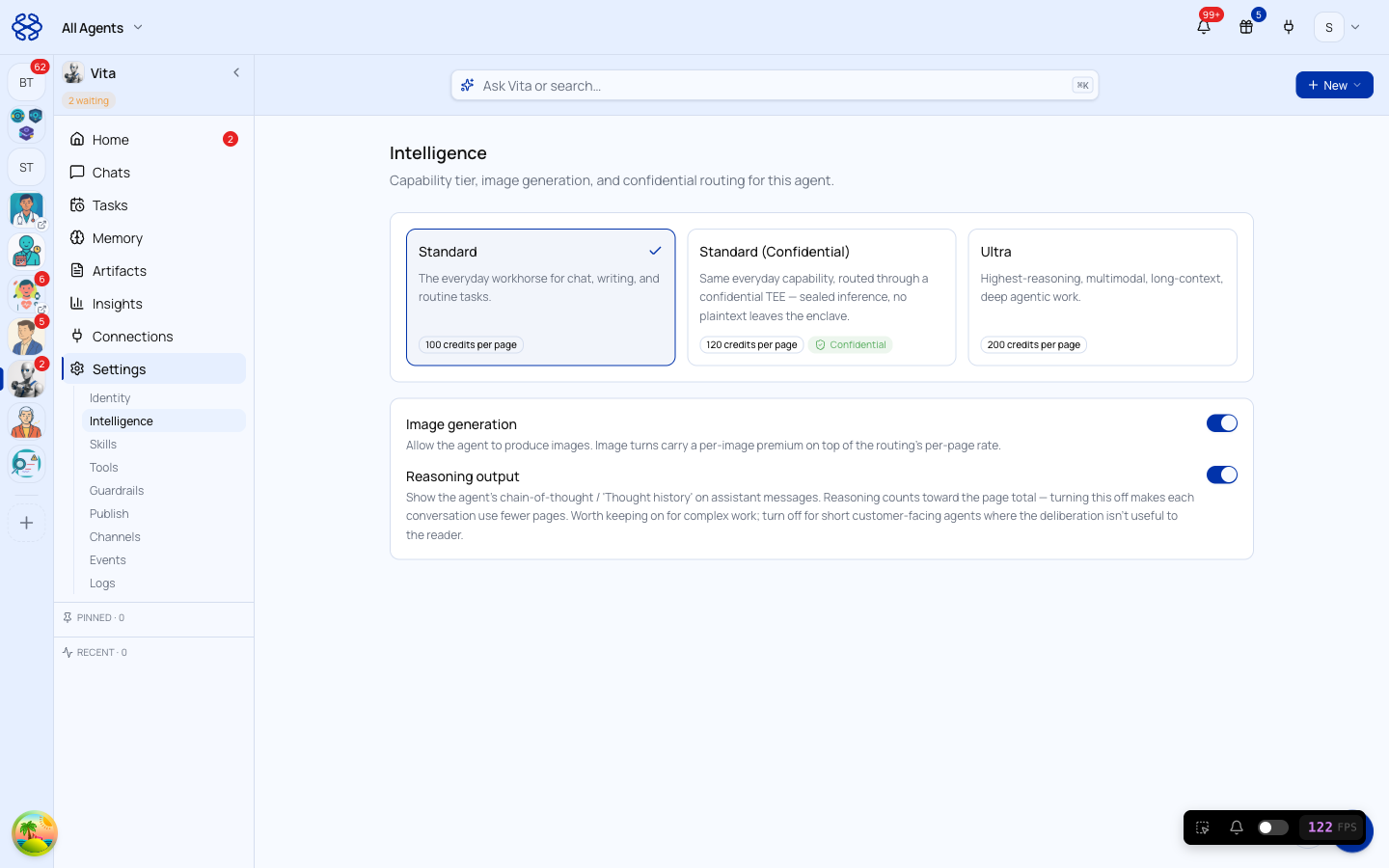
Intelligence settings in BlueNexus — three capability tiers, with confidential compute selected

Turn it on per agent.

Confidential compute is a setting on each agent — not a whole-account switch. Pick it when you build the agent, or toggle any existing agent over in Settings → Intelligence.

Sealed inference. No plaintext leaves the enclave. Not even we can see what's being processed.

Runs at a small premium per page. Visible in the agent's settings before you commit — no surprises.

One person. Same Slack. Different scopes per agent.

The same user can connect the same provider (Slack, GitHub, Salesforce) with different permission scopes for different agents. Agent A — your sales-enablement agent — gets read-only Slack to summarise channel discussions. Agent B — your customer-research agent — gets write access to post research findings into a dedicated channel. Two different OAuth grants, two different scope sets, one person.

The scopes are enforced at the OAuth grant, not by trusting the LLM to behave. The provider sees the agent's actual permissions; the LLM doesn't have the option to overreach.

Where to next?

Subscribe to our newsletter

Get product insights, AI and product thinking delivered to your inbox.